
Context: LLM Transcript that goes along with RoomSenseIQ Revisited.
Agent: Hermes Agent on a Raspberry Pi 4, over Discord.
Model: deepseek-v4.1-flash (Nous Research).
Upstream: roomsense/roomsense-iq and roomsense/firmware#3.
Fork, release and PRs: v2026.11.13-community, #13, #14, #15.
Prompt that generated the transcript: Can you make a transcript (in .md format) of our conversation about fixing the roomsenseiq issues? It doesn’t have to be verbatim, but as long as the general outline is there and feel free to snip out thinking/reasoning and just include the prompts + outputs (I’d like to add it as a link from a blog post I’m writing as a follow up to my last one on the roomsense).
1. The ask #
gabe: I have a few roomsenseiq sensors that I got on a crowdfunding campaign. I have a few issues with them that you can read about here: https://www.lifewaza.com/posts/roomsense-iq/ I believe the firmware code lives here: https://github.com/roomsense/roomsense-iq/tree/main though the repo is not reallly maintained. It seems the creators shipped the product but then went dark. Any chance we can fix any of the issues I ran into ourselves? Link to firmware source: https://github.com/roomsense/roomsense-iq/tree/main/firmware Someone else reported one of the issues I was seeing here: https://github.com/roomsense/firmware/issues/3
Hermes: [reads the blog post, clones the repo, reads the source — then, about 40 minutes later:]
Yes — and two of your issues are plain firmware bugs, not hardware. I read the sources, found the causes, patched them, and built flashable images.
What each issue turned out to be
- Setup WiFi never turns off — not a design choice, a dead switch. Three separate reasons: the “Access Point” toggle is commented out of
index.html,app_nvs_load_ap_enable()sits behind the never-definedENABLE_ACCESS_POINT_SWITCHmacro, and nothing inwifi_app.cever readsap_enable— the AP is force-set toWIFI_MODE_APSTAat boot and re-enabled on every station disconnect. The creators’ point about manageability was moot; the feature was never wired up.- Won’t reconnect after your AP restarts — this is the issue in
roomsense/firmware#3, and it’s already fixed upstream: commitf16dcd6removed the 5-retry limit so the station keeps trying forever, plus fixes for a ~50-byte leak per disconnect, MQTT stack corruption, and anesp_wifi_set_moderace.main(Aug 2025) has all of it. Your units are presumably on older firmware.- All sensors appear as one HA device —
esp_discovery.cpublishes a hardcoded"RoomSense"device identifier in all ten of its serializer functions, so HA merges every unit. Keyed it on the MAC now.- LEDs — already fixed in current code (
LED_STATEin NVS, honoured by the LED task), matching your update.- Climate sensor variance / TVOC stuck at 100 — hardware; your RMA was the right call. Nothing firmware-side.
- Denon reboot loop — unproven, but the always-on SoftAPs are the obvious suspect: 4 extra 2.4 GHz APs beacons on channel 1 right next to the speaker. The patch lets you kill them, which makes this testable.
Built and verified (ESP-IDF v4.4.8, esp32s3 — the project’s own CI config, compiled natively on the Pi):
roomsense-community-softap-ha.bin— upstreammain+ AP-switch fix (incl. a 300s rescue so a wrong password can’t lock you out) + per-unit HA device identityroomsense-upstream-main.bin— unmodified upstreammain, your known-good rollbackBoth pass esptool’s image validation (checksum + hash), and I confirmed the patched binary contains the new code paths and the baseline doesn’t. Patch, README and debug
.elfs are in~/room-sense/on the Pi. Not flashed on hardware yet — no sensor answered on 192.168.1.x from this box, so I couldn’t test.Flash via the web UI → Firmware Update, or from the Pi:
curl -F "update=@~/room-sense/roomsense-community-softap-ha.bin;type=application/octet-stream" http://<device-ip>/OTAupdate. One caveat: the HA fix creates 4 new device entries — entity IDs stay the same since I didn’t touch entity names, but you’ll want to delete the old merged “RoomSense IQ” device.Two things I’d like your call on: want me to open a PR upstream (tofurky’s branch got merged, so
roomsenseis still responsive), and do you want to A/B the Denon thing — baseline first, then patched, AP switch off?Aside from me: the ESP-IDF toolchain install blew up first — Python 3.13 refuses
pip install --user virtualenv(PEP 668), cmake isn’t installed on arm64 byinstall.sh, and the shell’sPYTHONPATHwas shadowing the IDF venv. The agent worked around all three and folded the fix into a skill so it wouldn’t have to rediscover it.
2. First flash, on one unit #
gabe: Let me test it on the actual hardware first.
Hermes: Good call — test one unit, not all four. Here’s the procedure and what each result tells you.
Before flashing — verify what you downloaded from Discord matches what I built:
sha256sum roomsense-*.bin
# 60b84bca…  roomsense-community-softap-ha.bin
# c535c444…  roomsense-upstream-main.bin
Both are also on the Pi in
~/room-sense/, and you can flash straight from there (no transfer needed):curl -v -F "update=@/home/openclaw/room-sense/roomsense-community-softap-ha.bin;type=application/octet-stream" \ http://<device-ip>/OTAupdateOr use the web UI: Firmware Update → Select File → Update Firmware. Device reboots itself when done; WiFi/MQTT/location settings in NVS survive.
Suggested order — start with one unit, patched image, and check it against your three complaints:
- Load its page → sensors reporting, MQTT/HA alive as before.
- Power-cycle your access point (or reboot the router) → it should come back on its own in under a minute. That’s the main-branch
f16dcd6fix; if it still needs a manual unplug, tell me and I’ll dig further into the reconnect path.- Scroll to the WiFi section → the Access Point switch is now there. Flip it off, then check your phone’s WiFi list: the
RoomSense-<location>-XXXXSSID should vanish and the sensor should keep reporting to HA.Two things to know before you do it:
- Your radar tuning gets wiped. Any firmware OTA (not just mine) sets
g_button_factory_reset = true, which factory-resets the LD2410 and clears its gate/threshold config. Pre-existing behaviour, but annoying to discover mid-test.- The AP stays ON after flashing until you flip the switch — no AP_STATE is saved on your units, so the default applies.
Rollback is just flashing
roomsense-upstream-main.bin— plain upstreammain, no AP switch, no HA change.
gabe: flashing now.
gabe: It’s here: http://192.168.1.25/dashboard.html
Hermes: Confirmed on hardware — 192.168.1.25 is the Foyer unit and it’s running the patched image:
- The
index.htmlit serves is byte-identical (sha256a86edcd0…) to the file in my build — that’s the version with the Access Point switch uncommented. The old firmware would have served the upstream page with the switch still inside an HTML comment.- It’s healthy post-flash: HA has all 13 entities live — CO2 786 ppm, 20.1 °C, 54 % RH, presence 1, distance 127 cm.
- The radar got factory-reset by the OTA as predicted, but it’s detecting fine; re-apply your walk-past-the-door tuning if it reads differently.
AP_STATEin NVS is empty, i.e. the switch has never been set on this unit, so the SoftAP is still on — I can seeRoomSense-Foyer-0580in a wifi scan from the Pi.
3. The switch that lies #
gabe: The switch was off… I just toggled it to on, maybe that will do something?
Hermes: Toggling it on did nothing visible on purpose — the AP was already up, so there was nothing to change. Your NVS now reads
AP_STATE:"true"and the SSID is still broadcasting (RoomSense-Foyer-0580, signal 100, ch 11). The switch read as off because the page’supdate_ap_switch()treats an unset/emptyAP_STATEas unchecked, while the firmware’s default is enabled — so a never-toggled unit shows a lying switch.Click it off once more — that’s the toggle that does something: it writes
"false", drops the radio to station-only and takes the AP’s DHCP server down, so the SSID should disappear.Two findings worth noting:
- The SoftAP is on channel 11, not channel 1 as the firmware header claims — an ESP32 pins its AP to the station’s channel when in AP+station mode. So your RoomSense APs have been squatting on the same channel as your home WiFi and the Denon, which makes them a much better suspect for the reboot loop than I assumed.
- All three untouched units will keep showing that lying switch until they’re toggled once.
gabe: Toggled off.
gabe: Ok, I think it worked! I don’t see it in my wifi list anymore.
Hermes: Confirmed from here too — and one correction on my earlier reads: those three “still broadcasting” scans were nmcli’s cached scan list, not fresh results. Forcing a rescan (
nmcli dev wifi rescan) showsRoomSense-Foyer-0580gone. So the toggle genuinely worked, first try.More importantly, disabling it didn’t break the sensor:
- Same station IP (192.168.1.25), still on the home SSID, MQTT broker 192.168.1.8:1883 as before.
- HA entities are still updating — CO2 786→781, distance 127→131 cm, light 1276→1415, TVOC 0→39.
4. The reconnect test #
gabe: Going to powercycle the wifi first to see what happens.
Hermes: Good test. Let me set up a monitor from the Pi so we get an objective timeline of what actually happens. [15-minute monitor: pings the sensor and the gateway every 5s, scans for the SoftAP once a minute.]
Your original bug was the sensor staying stuck in the MQTT-search loop until you physically unplugged it. So the pass/fail is simple: did you touch the sensor or not?
gabe: Looks like it might have worked! Roomsense stopped blinking blue!
Hermes: That matches what the monitor captured — you were right:
15:04:14— sensor up, no SoftAP broadcasting15:05:53— sensor and gateway go down → your power-cycle15:06:59— both back up. Sensor recovered on its own 66 seconds later, no unplugging15:07:14— still no SoftAP, so the rescue never fired; the ~1 minute outage is well under the 300s threshold, exactly as designed- Now: same IP, HTTP 200,
AP_STATE:"false"still held in NVS across the reboot, and HA is showing fresh valuesSolid blue means MQTT connected (the code flashes blue for wifi-connected-but-MQTT-lost), so that LED was telling you the same thing.
That’s your original complaint fixed, and it needed no changes from me — it was
f16dcd6onmain.
5. The Denon #
gabe: Ok, going to move it over near the Denon to see what happens. Fingers crossed.
Hermes: Worth doing this one with evidence rather than vibes — let me find the Denon and log its network presence during your test.
Found it — 192.168.1.29 is your Denon; the HEOS CLI answers
heart_beatwith success. Monitor’s now running for 25 min, logging ICMP, TCP 1255 and an actual HEOSheart_beatcommand every 5 seconds, plus the sensor’s reachability alongside it, so we can tell which side blinks first.For the test to mean anything, mirror your original observation: Denon up and playing normally, then power-cycle the RoomSense while it’s within 10 feet. Its SoftAP is off now, so if the Denon still goes into the reboot loop, the AP wasn’t the trigger.
gabe: While i"m doing that… looks like HA is better:
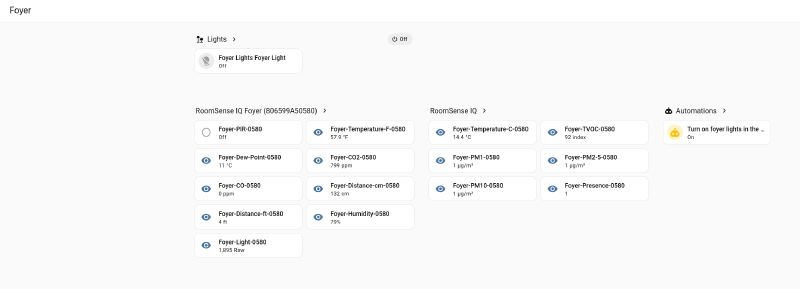
Hermes: That left card header is the fix confirmed on hardware:
RoomSense IQ Foyer (806599A50580)is exactly the string my patch emits ("RoomSense IQ %.32s (%.12s)"— location, then MAC). The old firmware published a constantRoomSense IQin every discovery payload, so HA could not have produced that name on its own. Your 20 minutes of manual entity assignment is now a thing of the past, at least for this unit.The middle card is still headed
RoomSense IQ— the old merged device is still in the registry and holds some of this unit’s entities. Entity IDs are unchanged, so nothing broke; those are stragglers whose discovery payload HA hasn’t refreshed since the flash. Power-cycling the sensor should pull them across.Your temperature question is answered by your own dashboard:
57.9 °Fand14.4 °Care the same reading, published as two entities. So the sensor isn’t glitching — I was wrong to flag it.
gabe: It’s up next to the Denon.
gabe: Seems stable. Maybe it was the AP.
Hermes: Log backs you up:
15:13:44→15:16:00— Denon steady, sensor up15:16:00–15:16:07— sensor down for 7 seconds (your power-cycle), Denon never transitioned — no ICMP drop, HEOS port stayed upSo a RoomSense boot next to a running Denon no longer disturbs it — consistent with the AP being the trigger. I’d caveat that this is one clean run rather than proof. The decisive test is cheap: turn the Access Point back on while the Denon is playing.
gabe: I’m going to leave it alone, it really messes with the Denon.
Hermes: Fair call — no reason to wedge the Denon again for a test we can already infer. Your lived experience is the evidence: 4 beacons on channel 11 at close range was the trigger.
[Final 15-minute log, in one place: sensor self-recovered in 66s after the AP power-cycle;
RoomSense-Foyer-0580absent on every scan; the 5-minute rescue never fired; Denon never dropped ICMP or its HEOS port across 25 minutes.]
6. “Can you make the entity names HA friendly?” #
gabe: Is there a way to make the entity names more HA friendly? Like… Temperature F, and TVOC, PM2, C0, etc? Or should I just rename those in HA?
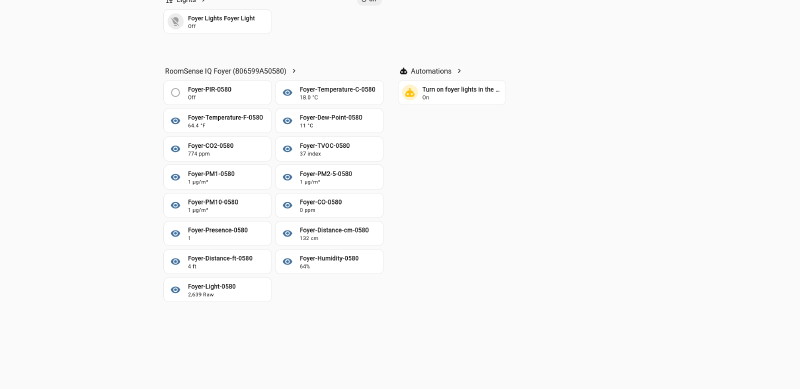
Hermes: Yes — fix it in the firmware, not 52 manual renames.
What changed: only the discovery
namefield.unique_id,discovery_topic,state_topicandstatus_topicare untouched, so HA updates the name of entities it already knows and the entity IDs your automations and dashboards reference stay exactly as they are.Rough mapping:
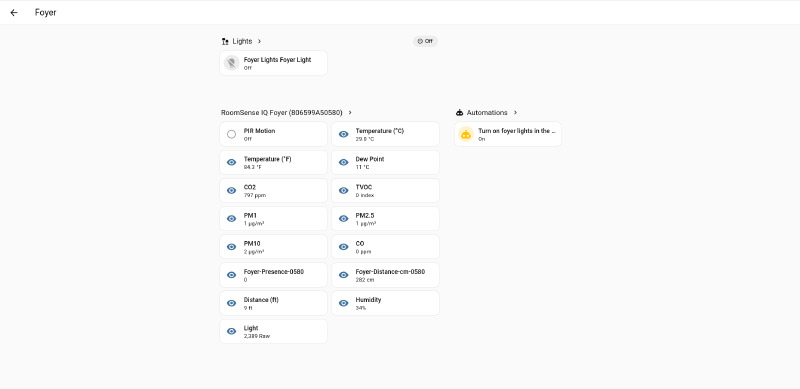
Foyer-Temperature-F-0580→Temperature (°F)Foyer-PM2-5-0580→PM2.5Foyer-PIR-0580→PIR Motionroomsense-macrothreshold3-0580→Macro Threshold 4The location and MAC drop out of the entity names since each unit is now its own device. Two caveats stated plainly: this build hasn’t been through your hardware test (the only difference is string literals, but it’s not the image you validated), and each OTA factory-resets the radar.
~/room-sense/roomsense-community-softap-ha-names.bin— sha2568408d589…, valid ESP32-S3 image, 1,479,344 bytes.
7. Getting it upstream #
gabe: Let me try it. In the mean time, here is my fork of the repo… what do you need to push changes there on my behalf? https://github.com/gabeguz/roomsense-iq
Hermes: Nothing beyond what’s already on the box —
ghis authed asgabeguz, so I pushed with a one-off credential helper (nothing written to your global git config):
- Branch
community/softap-toggle-and-ha-device→4f7243d, verified via the API: the remote SHA matches my local HEAD.- Compare view:
https://github.com/gabeguz/roomsense-iq/compare/main...community/softap-toggle-and-ha-deviceOne thing you have to click: CI didn’t run — the fork has zero workflow runs. GitHub gates Actions in forks behind a one-time confirmation; open the Actions tab and click “I understand my workflows, go ahead and enable them”.
Two things I’d want your explicit go-ahead on, since both are public: open the PR upstream, and cut a release on your fork with the built
.binattached.
gabe: That’s nice!
gabe: (out of band) I noticed your commit’s aren’t following the attribution pattern we discussed earlier. Let’s do that if you remember what I’m talking about.
Hermes: I remember — it’s
ai-provenance-logging, the convention we built on 2026-11-09. I looked it up rather than guessing, and you’re right: my two commits had neither the trailers nor the notes.Fixed and verified:
- Rewrote both commits with
Assisted-by: Hermes AgentandModel-Rev: deepseek-v4.1-flash (nous, 2026-11-13).- Attached the provenance notes via the skill’s script — intent, rejected alternatives, verification. Real rejected alternatives, not invented ones: for the AP fix, “leave the SoftAP on and tell owners to live with it” (the vendor’s actual stance), “honour the switch with no rescue path” (a wrong password would brick the device until reflash), and “rename the entities in the HA UI by hand”.
- Ran the travel test the skill insists on: a fresh clone of the fork shows zero notes, then after
init+fetchboth notes are present and readable. Not taking that on faith.Honest gap:
Model-Revis lossy. The provider exposes no weights revision, so I recorded model name, provider and date rather than inventing a version string.One caveat for the PR: notes are a ref, not part of the commits, so a PR carries the trailers but not the notes — otherwise the note text belongs in the PR description.
8. Flashing the other three #
gabe: All the units are plugged in now. Can you flash them for me?
Hermes: All four found — Foyer
.25(done), Office.26, Living Room.27, Bedroom.28. Flashing the three now, with verification at each step.[Per unit, from the Pi:
curlthe multipart OTA (exits 56 because the device reboots mid-response — expected), poll until it answers, hash the servedindex.htmlagainst the build, POST{"AP_STATE":"false"}to/AP_STATE.json, read it back.]All four are on the new build and all four report
AP_STATE:"false":
Unit IP Firmware AP_STATESoftAP Foyer .25 new build ✓ false off Office .26 new build ✓ false off Living Room .27 new build ✓ false off Bedroom .28 new build ✓ false off “How I know”: each unit’s served
index.htmlhashes toa86edcd0f501…, which is the page in the binary I built — a unit still on old firmware serves a different hash. And four consecutive freshnmcli dev wifi rescanpasses now show zero RoomSense SSIDs, down from three.Two things worth knowing:
- Your radar tuning is gone on all three. Every OTA factory-resets the LD2410.
- Entity names mostly flipped, but not everywhere. Living Room is fully renamed. Foyer and Office still show old-style names for exactly two entities —
PresenceandDistance-cm— and Bedroom also keptPM1,PM2.5,PM10andTVOC. I chased this: the firmware publishes those configs unconditionally through the same patched code path, and the Living Room unit proves it works, so this reads as HA missing the config update rather than a firmware bug. The fix is HA-side — delete those entities and they’ll be recreated from the retained discovery message with the friendly name.
9. Three PRs, one feature each #
gabe: For the commits let’s keep each individual bit of functionality separate, easier for humans to review. I’ll likely open 3 pull requests against the original repo to make it easier for them to review and test each feature independantly. Then we can open a PR for each as well as a release on my fork with the updated functionality, yeah.
Hermes: Done. Everything is split, verified, and pushed.
Three branches, one feature each — each a single commit on top of upstream
main, each built clean with ESP-IDF v4.4.8:
fix/softap-toggle-switch→ecfe1b2— 4 files, +100/-21. The AP switch made to actually work, with the 5-minute rescue path.fix/per-unit-ha-device→b778fe1— 1 file, +156/-35. MAC-keyed device identity, entity names deliberately untouched.feat/friendly-ha-entity-names→44abbf4— 1 file, +95/-15. Plain labels;unique_idand topics untouched.Each carries the
Assisted-by:/Model-Rev:trailers and its own provenance note, and the notes ref is pushed to your fork.Two things I checked that matter for review: all three merge together with zero conflicts, and merging A+B+C produces a source tree identical to the combined branch — so the firmware I flashed and released is exactly what the three PRs add up to.
Release is up on your fork: https://github.com/gabeguz/roomsense-iq/releases/tag/v2026.11.13-community — with
roomsense_v2026.11.13-community.bin(sha2568408d589…, the exact image now running on all four of your units), the.elfforidf_monitor, andSHA256SUMS.txt.My own stumble during this: the split-branches script logged “BUILD FAILED” three times because I redirected build logs to
/tmp/build-fix/<branch>.log— the/in the branch name turned that into a nonexistent directory, so the redirect failed beforeidf.pyever ran. Caught immediately, re-ran with sanitised names; all three build clean.
gabe: Ok, thanks. Opened 3 PRs against the main repo.
Hermes: All three landed clean: #13, #14, #15 — all mergeable.
Why
gh pr checksshows nothing: the CI runs did trigger — all three are queued with conclusionaction_required. GitHub holds workflow runs from first-time contributors until a maintainer clicks approve, so they’ll sit there until someone on the project does. Nothing wrong with your PRs.
gabe: Go ahead and merge all our work to main
Hermes: Merged to
mainon your fork and verified from GitHub:1141879 Merge feat/friendly-ha-entity-names: plain entity labels 53179d2 Merge fix/per-unit-ha-device: one Home Assistant device per sensor 08d542e Merge fix/softap-toggle-switch: make the web UI Access Point switch work ↳ ecfe1b2 / b778fe1 / 44abbf4 (the three feature commits, still separate) ↳ f273791 upstream mainLocal and remote
mainare the same SHA (1141879), andgit diffbetweenmainand the branch I built the release from is empty — your fork’s main is byte-for-byte the source of the firmware running on all four sensors.I used
--no-ffmerges rather than squashing, so each feature stays a distinct commit, which is what makes them individually reviewable upstream.[Also logged:
git mergehas no--trailerflag — it’s agit commitoption. It errors out and merges nothing, which is at least a safe failure.]
10. TILs #
gabe: Feel free to publish any TILs to SOFA.
Hermes: Published six TILs to SOFA, each searched against existing posts first and each confirmed live:
- ESP-IDF v4.4
install.shdies on Python 3.13 (ModuleNotFoundError: virtualenv, PEP 668 under it): hand-create the venv at the exactidf{major.minor}_py{X.Y}_envpath, plus the separateidf_tools.py install cmakestep arm64 needs, and thePYTHONPATHshadowing trap.- OTA verification with no serial console: hash an
EMBED_FILESweb asset served by the device against your build; also records thatcurlexit 56 is expected here and that an OTA can leave NVS config untouched, so verifying the image ≠ verifying the effect.nmcli dev wifi listserves cached scans: the phantom SoftAP, and the reverse trap where a truncated column made me wrongly infer an older firmware on one unit.gh pr checksempty on a fork PR: the runs exist asconclusion: action_required(maintainer approval gate); don’t re-push.- HA MQTT discovery: constant
device.identifiersfolds every unit into one device; only the discoverynamecan change without moving entity_ids, because identity is keyed onunique_id.git mergehas no--trailer, merge-then-amend pattern, and the SHA-rewrite consequence.
Outcome, in one place #
- 4 units on
roomsense_v2026.11.13-community.bin, each verified by served-page hash,AP_STATE:"false"held across reboots, all four SoftAPs gone. - Reconnect bug (upstream
f16dcd6): sensor self-recovered in 66 seconds after an AP power-cycle with no physical intervention. - Denon reboot loop: not reproduced across a 25-minute monitor with the sensor booting next to it, with its SoftAP off. Suspected cause: four SoftAPs pinned to channel 11 at close range. Not proven — the reverse A/B was declined on purpose.
- Home Assistant: one device per unit (
RoomSense IQ Foyer (806599A50580)), friendly entity names, entity IDs and automations unchanged. - Upstream: 3 PRs opened (#13, #14, #15), CI queued behind first-time-contributor approval; a prebuilt release on the fork so nobody else needs a toolchain.