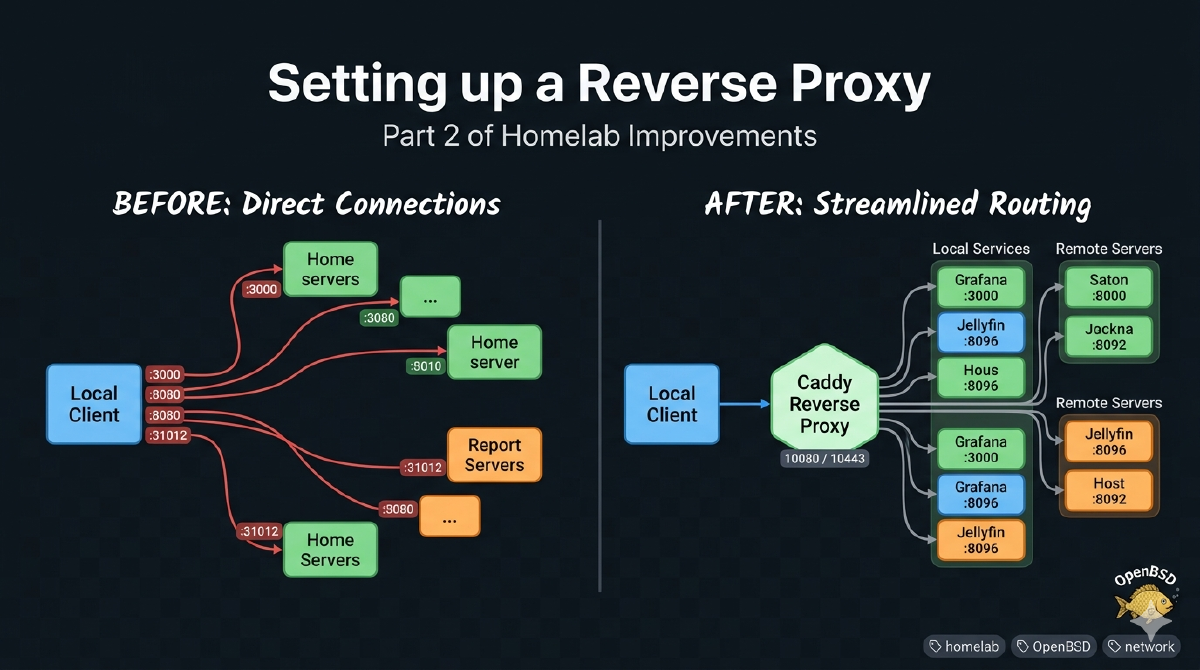

The first step on my homelab improvement journey is setting up a reverse proxy.
A reverse proxy is a server that sits in front of your other servers. Instead of sending requests directly to the server where the application is running, you send them to the proxy and it proxies your request to the real server. It’s called a reverse proxy because a “normal” (or forward) proxy sits in front of client machines to proxy outbound requests to the internet, while a reverse proxy proxies inbound requests to the servers.
A reverse proxy will allow me to hide the complexity of IP addresses and ports behind the proxy server. It will know what services live where, and what ports they listen on. I could have just added internal DNS names for all my servers, but then I’d still need to keep track of port numbers (immich.lifewaza.com:30041 for example) and deal with TLS on a service by service basis.
State diagrams #
Before adding a reverse proxy #
In the current setup, all requests go directly to the server and port they are listening on.
graph TD
    classDef default fill:#ffffff,stroke:#cccccc,stroke-width:1px;
    classDef host fill:#ffffff,stroke:#333333,stroke-width:2px;

    Client[Local Client]

    subgraph Server1 ["Server 1 (192.168.1.10)"]
        G[Grafana :3000]
        U[UniFi Gateway :8080]
        F[FreshRSS :80]
        L[Llama.cpp Web UI :8090]
    end
    class Server1 host;

    subgraph Server2 ["Server 2 (192.168.1.7)"]
        A[Actual Budget :31012]
        K[KaraKeep :30147]
        D[Dawarich :30161]
        I[Immich :30041]
        J[Jellyfin :8096]
        M[Mealie :30111]
    end
    class Server2 host;

    %% Direct Connections
    Client -->|192.168.1.10:3000| G
    Client -->|192.168.1.10:8080| U
    Client -->|192.168.1.7:31012| A
    Client -->|192.168.1.7:30041| I

    %% Layout constraints
    G ~~~ U ~~~ F ~~~ L
    A ~~~ K ~~~ D ~~~ I ~~~ J ~~~ M
    Server1 ~~~ Server2
After adding a reverse proxy #
In the improved setup, all requests go to the proxy server and it decides where to send them.
graph TD
    classDef default fill:#ffffff,stroke:#cccccc,stroke-width:1px;
    classDef host fill:#ffffff,stroke:#333333,stroke-width:2px;
    classDef proxy fill:#d4edda,stroke:#28a745,stroke-width:2px;

    Client[Local Client]

    subgraph ProxyHost ["Server 1 (192.168.1.10)"]
        Caddy[Caddy Reverse Proxy
 Ports: 10080 / 10443]

        subgraph Server1 ["Local Services (Host 1)"]
            G[Grafana :3000]
            U[UniFi Gateway :8080]
            F[FreshRSS :80]
            L[Llama.cpp Web UI :8090]
        end
    end
    class ProxyHost host;
    class Caddy proxy;

    subgraph Server2 ["Server 2 (192.168.1.7)"]
        A[Actual Budget :31012]
        K[KaraKeep :30147]
        D[Dawarich :30161]
        I[Immich :30041]
        J[Jellyfin :8096]
        M[Mealie :30111]
    end
    class Server2 host;

    %% Inbound Traffic to Proxy
    Client -->|https://grafana...| Caddy
    Client -->|https://actual...| Caddy

    %% Proxy Traffic to Local Host 1
    Caddy -->|localhost:3000| G
    Caddy -->|localhost:8080| U
    Caddy -->|localhost:80| F
    Caddy -->|localhost:8090| L

    %% Proxy Traffic to Remote Host 2
    Caddy -->|192.168.1.7:31012| A
    Caddy -->|192.168.1.7:30147| K
    Caddy -->|192.168.1.7:30161| D
    Caddy -->|192.168.1.7:30041| I
    Caddy -->|192.168.1.7:8096| J
    Caddy -->|192.168.1.7:30111| M

    %% Layout constraints
    G ~~~ U ~~~ F ~~~ L
    A ~~~ K ~~~ D ~~~ I ~~~ J ~~~ M
Options #
When I started looking into this, I knew there were at least 3 tools I could use to setup a reverse proxy, OpenBSD’s relayd, nginx, and caddy. I know there are others as well, but these were the first 3 that came to mind.
I did a bit of research on the 3, and caddy seemed like the easiest
starting point for my setup. It could work as a reverse proxy, it automatically
handled TLS and there was an OpenBSD port for it which meant I
could install it easily.
I’ll take a deeper look at relayd in the future as I like to use the
OpenBSD base tools when I can.
Installing Caddy on OpenBSD #
Thanks to the OpenBSD ports system, installing caddy is as simple as:
doas pkg_add caddyAnd then to tell OpenBSD to enable the deamon and start it:
$ doas rcctl enable caddy
$ doas rcctl start caddy
(failed)
I wasn’t sure why it failed to start, but I figured it had to do with the configuration that I was about to change so I didn’t look into it further.
Minimal config #
Here is the default caddy config on OpenBSD:
# see https://caddyserver.com/docs/
{
    # bind locally-only by default i
    default_bind [::1] 127.0.0.1
    http_port 8080
    https_port 8443

    # admin API endpoint on unix socket
    admin unix//var/caddy/admin.sock|0220

    # don't try to install internal CA to system
    skip_install_trust
}

localhost {
    root * /var/www/htdocs file_server
}
Port issues #
caddy binds to localhost (127.0.0.1) on ports 8080 and 8443. This is a common
pattern for services on OpenBSD, by default they only listen on the local
interface so they aren’t accidentally exposed to the internet. My goal was to
have caddy handle all HTTP (80) and HTTPS (443) traffic for my entire home
network. With that in mind, I updated the caddy configs and attempted to start
it. Starting caddy didn’t work due to two issues:
-
httpd, the OpenBSD web server was already running on ports 80 and 443 (serving FreshRSS my RSS feed aggregator). -
Ports 80 and 443 are privileged, which means only
rootcan bind to them, butcaddyruns as an unprivileged user_caddy.
Given the two points above, I decided the best move would be to keep caddy
listening on ports 8080 and 8443 as it was originally configured so I switched
the config back, and tried to start it again.
$ doas rcctl start caddy
(failed)
There weren’t any error messages in the logs. And I wasn’t sure how to see a
deamon’s output after starting it up. At first I tried to run it in the
foreground using doas though I felt like there must be a better way, since
it’s unlikely I’m the first person to ever need to see a deamon’s output while
it’s starting up. Luckily the internet came through for me and told me about the
-d flag to rcctl which was just what I needed to see the error output during
startup.
Actually, the docs don’t mention what -d, -q, or -f do which is surprising given how known OpenBSD is for good documentation. Looking at the source for the rcctl script, apparently they are -d (debug), -q (quiet), -f (force).
$ doas rcctl -d start caddy
doing _rc_parse_conf
caddy_flags empty, using default >--config /etc/caddy/Caddyfile<
doing rc_check
caddy
doing rc_start
doing _rc_wait_for_start
doing rc_check
... (noise redacted) ...
... listening on :8443: listen tcp :8443: bind: address already in use
doing _rc_rm_runfile
(failed)
Oops, looks like something else is already listening on port 8443. I wasn’t sure
what was so I used fstat(8) to check.
fstat is a program that displays the status of open files. We can use it to
find out what program is listening on a specific port.
$ fstat |grep :8080
_unifi   java       32329  179* internet stream tcp 0x0 *:8080
$ fstat |grep :8443
_unifi   java       32329  186* internet stream tcp 0x0 *:8443
It looks like the unifi web portal is currently running on the two ports that I need. I have no idea where to change the default ports this software runs on, so I guess I’ll pick two other ports for caddy.
After some searching I found that ports 10080 and 10443 were available so I told
caddy to use those:
# see https://caddyserver.com/docs/
{
        # bind locally-only by default
        default_bind [::1] 127.0.0.1

        # pf handles redirection from port 80 and 443
        http_port 10080
        https_port 10443

        # admin API endpoint on unix socket
        admin unix//var/caddy/admin.sock|0220

        # don't try to install internal CA to system
        skip_install_trust
}
And then tried starting caddy again:
$ doas rcctl start caddy
caddy(ok)
Great success!
Adding services to Caddy #
Now that the reverse proxy was running, I needed to tell it about the services that it would be proxying for.
I added an entry for each service in my Caddyfile so that it now looked like this:
# see https://caddyserver.com/docs/
{
        # bind locally-only by default
        default_bind [::1] 127.0.0.1

        # pf handles redirection from port 80 and 443
        http_port 10080
        https_port 10443

        # admin API endpoint on unix socket
        admin unix//var/caddy/admin.sock|0220

        # don't try to install internal CA to system
        skip_install_trust
}

# services hosted on this box (nuc)
grafana.lifewaza.com {
        tls internal
        reverse_proxy 127.0.0.1:3000
}

freshrss.lifewaza.com {
        tls internal
        reverse_proxy 127.0.0.1:8088
}

llama.lifewaza.com {
        tls internal
        reverse_proxy 127.0.0.1:8090
}

unifi.lifewaza.com {
        tls internal
        # Main UniFi Controler access
        reverse_proxy 127.0.0.1:8443
}

# services hosted on truenas
actual.lifewaza.com {
        tls internal
        reverse_proxy 192.168.1.7:31012
}

karakeep.lifewaza.com {
        tls internal
        reverse_proxy 192.168.1.7:30147
}

dawarich.lifewaza.com {
        tls internal
        reverse_proxy 192.168.1.7:30161
}

immich.lifewaza.com {
        tls internal
        reverse_proxy 192.168.1.7:30041
}

dozzle.lifewaza.com {
        tls internal
        reverse_proxy 192.168.1.7:30064
}

jellyfin.lifewaza.com {
        tls internal
        reverse_proxy 192.168.1.7:8096
}

mealie.lifewaza.com {
        tls internal
        reverse_proxy 192.168.1.7:30111
}

# truenas box
truenas.lifewaza.com {
        tls internal
        reverse_proxy 192.168.1.7:443
}
This basically tells caddy “When you get a request for
https://grafana.lifewaza.com, send that request to http://127.0.0.1:3000, and
do the same for the other services listed in this configuration file. The tls internal bit is telling caddy that it should also provide TLS certificates
for these services using it’s internal self-signed root certificate. We’ll talk
about that more in a future article.
One more restart of caddy so it could read the config changes:
$ doas rcctl restart caddy`
caddy(ok)
caddy(ok)
and now all my internal services are sitting behind a reverse
proxy. We’re not done yet however, as there’s still no way to get to them.
caddy knows about them, but if I type grafana.lifewaza.com into my browser,
I’m just going to get a “Server not found” error since I don’t have DNS
configured yet. That will be our next step.